


GPS Location Tracker Pro
3.5107.00 Reviews
App Specs
- Version
- 2.6.0.0
- Updated On
- License
- Free
- Downloads
- 5,000,000+
- Developer
- RadoanHossanDev
- Categories
- Maps & Navigation
- Platform
- Android
Screenshots
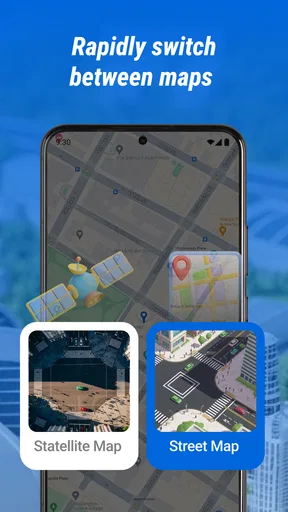
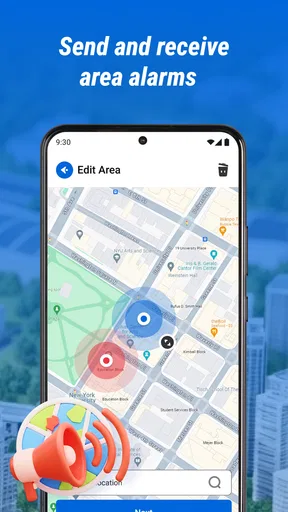
 Analysis by AppCompare
I find location apps most useful when they remove a small, recurring hassle rather than trying to replace every map on my phone. GPS Location Tracker Pro is aimed at keeping friends and family connected through location sharing, so I’d consider it for coordinating a meetup or checking that someone has reached a destination. That focus also sets the right expectation: it’s a companion for shared whereabouts, not automatically a full turn-by-turn navigation system.
Getting Started with GPS Location Tracker Pro
The first thing you’ll notice when you download GPS Location Tracker Pro is how easy it is to set up. You don’t have to jump through hoops to get it going. Just a few taps and you’re ready to start exploring. The user interface is sleek and intuitive, which is something I always appreciate in an app. I’m not a fan of overly complicated menus, and luckily, this app keeps things simple.
Where Location Sharing Can Get Stuck
With any location-sharing app, a map that looks empty or out of date can be confusing. I’d first check whether the phone itself can establish its position, then make sure the person you expect to see has actually chosen to share their location with you. A tracker can only show useful information when the relevant people and devices are participating; installing the app on one phone alone does not make a whole family visible.
It also helps to separate “where is this person?” from “how do I get there?” A location marker can help you meet someone, but it is not the same as route planning. For a drive, I would use a dedicated navigation app for directions and keep a tracker open only when seeing a person’s shared position adds something. That avoids treating a location pin as a promise that a route, arrival time, or live traffic guidance is available.
Setup Checks That Save Time Later
Before relying on the app for a time-sensitive meetup, I’d try a low-pressure test with someone I trust. Confirm that both people can open the app, locate the sharing controls, and understand whose position is being viewed. This small rehearsal catches the most common human snag: one person assumes sharing is active while the other is still looking at an old screen or has not completed the relevant step.
Location quality can depend on the phone’s surroundings and state, not just the app. A phone indoors, in a crowded urban spot, or with limited connectivity may not update as cleanly as one outdoors with a clear signal. If a marker seems wrong, I’d compare it with the person’s own description and allow a moment for the device to refresh before making plans around it.
I’d also agree on a simple sharing routine instead of leaving location sharing as an unexplained background arrangement. For example, decide when it is useful to share for a particular outing and when the check-in is finished. That makes the tool feel practical rather than intrusive, and it gives everyone a clear expectation about why a location is being viewed.
Worth Reading Before You Choose

Flipboard Shows What News Apps Must Do Beyond the Feed

Switching to Android Auto Means Rethinking Your Driving Routine

Google Calendar Makes a Crowded Week Easier to Manage

Ludo King Makes the Most of the Minutes Between Plans

Baby Panda World Brings Quick Play to Modern Phones, but Its Game Library Feels Busy

ESPN’s Live Game View Makes Following Close Games Easier
Features That Stand Out
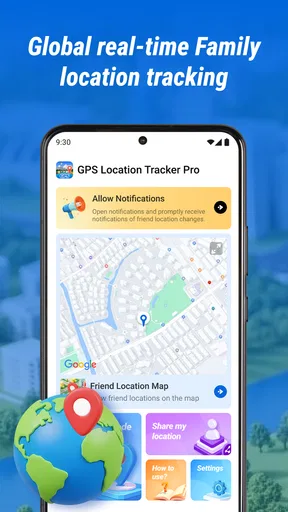
One of the standout features of this app is its real-time location tracking. Whether you’re hiking in the mountains or navigating through a busy city, this app provides precise and up-to-date information that you can rely on. I’ve used it during my morning jogs and even on a road trip, and it never failed to keep me on the right track.
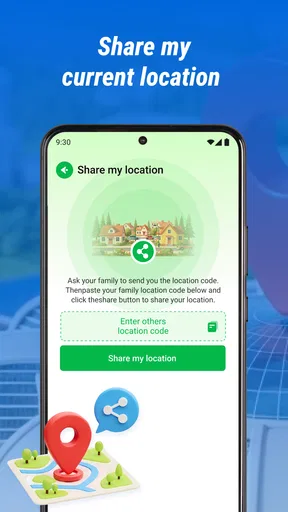
Another cool feature is the ability to share your location with friends and family. This can be particularly useful if you’re meeting someone in a crowded area or if you just want to let your loved ones know that you’re safe. The app makes it easy to send your coordinates with just a tap. No more endless texts trying to explain where you are!
A Realistic Routine for Meetups
Picture meeting a relative outside a busy station. Instead of sending a string of messages such as “I’m by the entrance” and then clarifying which entrance, you can use shared location as a reference and agree on a recognizable meeting point. I’d still send a short message naming the landmark: it provides context if the map is slow to refresh, and it helps avoid walking in circles when several nearby entrances look alike.
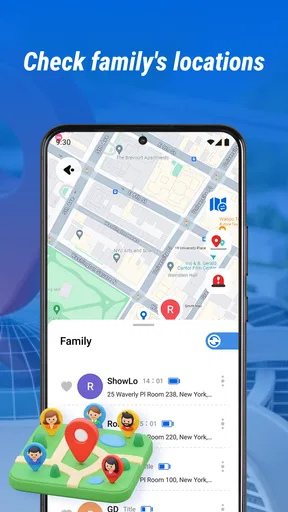
For a family member traveling home, the app can be a convenient way to check their progress without repeatedly asking them to text while they are moving. I would use it as a reassurance aid, not as a substitute for an agreed check-in or urgent communication. A location display is only helpful when the phone is available and reporting a usable position, so a direct call or message remains the sensible fallback if plans change.
Exploring and Discovering New Places
One of my favorite things about GPS Location Tracker Pro is its discovery mode. It’s like having a personal tour guide right in your pocket. The app suggests interesting places to visit based on your location, which is perfect for someone like me who loves to explore new spots. On a recent trip to a neighboring city, I discovered a quaint little coffee shop that I would’ve otherwise missed.
For the practical side of discovering a place, I’d treat a suggestion as a starting point rather than a guarantee that it suits the moment. If I’m coordinating with someone, I would share the intended destination in a message as well as use the location view, so both people know the name of the place they are aiming for. That is especially useful when an unfamiliar neighborhood has several nearby businesses or entrances.
Choosing It Alongside Other Map Apps
Compared with the usual mapping options, a location-sharing tool is strongest when the question is “where are we relative to each other?” A conventional maps app is generally the better choice when I need a planned route, transit details, or help finding a business by name. Messaging is often enough for a one-off “I’m here” note, while shared location can reduce repeated updates during a longer meetup or journey.
I wouldn’t keep several location tools running without a reason. Pick one shared method that everyone in the group can use comfortably, then open a navigation app separately when directions matter. This keeps the workflow clear: the tracker helps people coordinate, while the navigation app handles the trip. If your main need is turn-by-turn guidance and you rarely share your position, a standard map app is probably a better fit.
Staying Safe and Secure
Safety is always a concern when it comes to location tracking, and I’m happy to report that this app takes it seriously. It offers a range of privacy settings that allow you to control who can see your location. Plus, it doesn’t drain my battery as much as some other GPS apps I’ve tried, which is a huge plus in my book.
I’d make privacy part of the setup, not an afterthought. Before sharing, take a moment to check who is included and whether the arrangement still makes sense for the current situation. If you are helping a child or an older relative use a tracker, explain in plain language who can see the location and why. Clear consent and a shared understanding matter more than simply turning on a setting.
Battery expectations are worth keeping realistic, too. Location use can be demanding on a phone, and a long day away from a charger is not the moment to assume any tracking app will have no effect. If you need to preserve power, use location sharing for the period when it is useful, keep an eye on the phone’s battery, and agree on a direct check-in as a backup.
When a Missing Update Is Not the App’s Fault
If the displayed position stops changing, I would avoid immediately assuming the app has failed. The other phone may have lost connectivity, be indoors, have run low on power, or simply not be in a position to send a fresh update. Ask the person to check their own screen and connection when it is safe and convenient; don’t ask anyone to handle a phone while driving or crossing a busy area.
A calm recovery sequence is more useful than repeatedly reopening the same screen. Confirm that both people are looking at the right contact, have a working connection, and are using the intended sharing arrangement. Then give the view a chance to refresh. If the immediate goal is to meet, switch to a clear written landmark or a phone call rather than waiting indefinitely for a map to settle.
There are also cases where no app can resolve the underlying problem. A device that is switched off, left behind, or unable to communicate cannot provide a dependable current location. In a safety emergency, contact local emergency services or the appropriate trusted person; don’t treat a consumer tracking app as an emergency response service.
Performance and Usability
Performance-wise, the app runs smoothly without any lag or crashes. I’ve used it on both Android and iOS devices, and it works like a charm on both platforms. It’s lightweight, so it doesn’t hog your device’s resources. The app also integrates well with other navigation apps I use, which makes switching between them seamless.
The usability factor is high with this app. Even if you’re not particularly tech-savvy, you’ll find it easy to navigate through its features. The developers have done a great job in ensuring that the app is accessible to everyone, regardless of their tech skills.
It is a free maps-and-navigation app from RadoanHossanDev, with an Everyone age rating. Its current version is 2.0.0.0 and it runs on Android 7.0 or later. The published release date is Nov 21, 2025. It has an average rating of 3.9 from around 850 ratings, with over 1 million installs. I take that as a sign that it has found an audience, while remembering that ratings can’t tell me whether its particular sharing workflow suits my household.
For someone choosing between this and a family-oriented location service, the deciding question is how the group already communicates and what it needs to see. If everyone is comfortable with this app and the goal is straightforward location coordination, it may be convenient. If you need a broader set of family management tools, dependable route guidance, or a workflow already built into another service your group uses, that alternative may be simpler.
Who I’d Recommend It To
I can see this being useful for friends arranging to meet across a busy venue, relatives coordinating a shared outing, or someone who wants a simple way to let loved ones follow their whereabouts during a trip. It is most helpful when everyone involved understands the arrangement and is willing to use the same tool. The benefit is less about watching a map constantly and more about cutting down on repetitive “where are you?” messages at the right moment.
I’d skip it if you want a complete navigation replacement, need a location record for professional or safety-critical use, or are uncomfortable sharing location at all. It is also not a great fit for a group that cannot agree on who should see what; a simpler one-time message may be more respectful and less confusing. For occasional meetups, the convenience is real, but it should not create an expectation that every person is continuously available.
Final Thoughts
In conclusion, GPS Location Tracker Pro is a fantastic tool for anyone looking to enhance their navigation experience. Whether you’re an avid traveler, a daily commuter, or someone who simply wants to keep track of their whereabouts, this app has got you covered. Its combination of reliability, ease of use, and thoughtful features make it a must-have on your smartphone.
If you’re ready to take your navigation game to the next level, I highly recommend giving this app a try. You can download it from your usual app store and start exploring today. Safe travels!
Pros
- Highly accurate location tracking
- User-friendly interface
- Real-time updates
- Battery-efficient operation
- Customizable alerts
Cons
- Limited offline functionality
- In-app ads can be intrusive
- Subscription required for premium features
- Occasional signal drop in remote areas
- Some features require data connection
FAQs for GPS Location Tracker Pro
What features does GPS Location Tracker Pro offer?
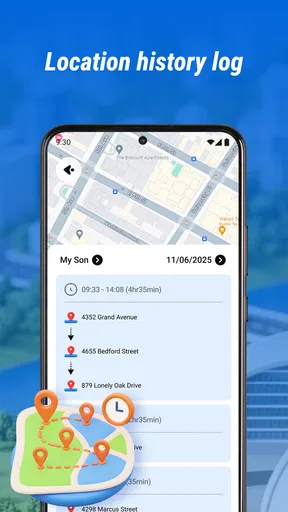
GPS Location Tracker Pro offers a variety of features including real-time location tracking, route history, geofencing alerts, and location sharing. Users can also access detailed analytics and reports to track travel patterns and distances. The app is designed for both personal use and for businesses that require fleet management.
Is GPS Location Tracker Pro compatible with all devices?
GPS Location Tracker Pro is compatible with most Android and iOS devices. It requires a stable internet connection and GPS functionality to operate efficiently. Users should ensure their device is updated to the latest operating system version to avoid any compatibility issues.
How secure is my data with GPS Location Tracker Pro?
The app prioritizes user security by employing advanced encryption protocols to protect location data. Users have control over who can access their location information and can set preferences within the app's privacy settings. Regular updates are provided to enhance security measures.
Does GPS Location Tracker Pro drain battery quickly?
Like many GPS-based applications, GPS Location Tracker Pro can be demanding on battery life, especially when running continuously in the background. However, the app is optimized to minimize battery consumption, and users can adjust settings to reduce impact by limiting location updates or using power-saving modes.
What are the subscription options for GPS Location Tracker Pro?
GPS Location Tracker Pro offers both free and premium subscription options. The free version includes basic features, while the premium subscription provides access to advanced functionalities such as detailed reports and unlimited location sharing. Users can choose a monthly or annual plan, with options to cancel anytime.


